
ssh连接失败
问题:ssh: connect to host xx.xxx.xxx.xxx port 22: Connection refused.
检查是否安装ssh服务
1
2
sudo apt-get install openssh-server
sudo service ssh start |status检查是否开放22端口
查看所有开放端口
1
netstat -aptn | grep 22
Ubuntu开放端口方法
1
2
3
4
sudo apt-get update # 更新源
sudo apt-get install iptables # 安装iptables
sudo iptables -I INPUT -p tcp --dport 8388 -j ACCEPT # 添加入站规则,开放8388端口
sudo iptables -save # 保存最终解决方法
查看ssh默认配置文件
1
cat /etc/ssh/sshd_config
修改配置文件 在Port 28171 下增加 Port 22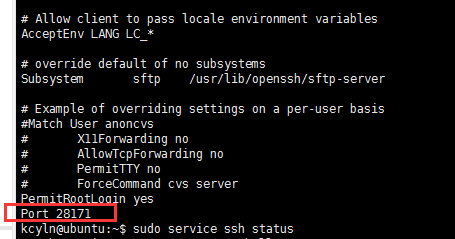
重启服务
1
sudo service ssh start
本博客所有文章除特别声明外,均采用 CC BY-NC-SA 4.0 许可协议。转载请注明来自 天涯海阁!
评论